
The Trailing Up feature allows your Spot Grid Bot to automatically shift its trading range upward in response to rising market prices. By dynamically adapting to price movements, it helps overcome a key limitation of traditional grid trading — where profits often stall once the price breaks out of the preset range — and enables you to capture additional gains beyond your original grid boundaries.
How It Works
When the market price moves one grid above the upper limit price, the Trailing Up feature will cancel the lowest buy order and place a new buy order at the previous upper limit. If the price continues to rise beyond the new upper limit plus the price interval, the bot will repeat the process — shifting the trading range up by one grid — to help you keep up with the market's upward momentum.
Let's walk through the process using an example.
- Lower limit price: 25,000 USDC
- Upper limit price: 30,000 USDC
- Market price: 26,500 USDC
- Number of grids: 5
- Price interval: 1,000 USDC
The bot will place buy and sell orders evenly across the price range based on the interval.
With Trailing Up disabled:
If the market price goes above the upper limit (30,000 USDC), the bot will stop placing new orders until the price moves back within the range.
With Trailing Up enabled:
When the market price reaches or exceeds 31,000 USDC (the upper limit + interval), the bot will shift the range up by one grid, canceling the lowest buy order at 25,000 USDC and placing a new buy order at 30,000 USDC (the previous upper limit).
If the price continues to climb past 32,000 USDC (31,000 + 1,000), the bot will shift the range up again. The new range becomes 27,000 USDC to 32,000 USDC.
In this example, the trading range shifted twice, so the Trailing Up count is 2.
Notes:
— Trailing Up will only function if two conditions are met: (1) there are at least five grids, and (2) there is enough available balance to place a new order at a higher price. This balance includes any accumulated grid profits and funds released from canceled orders.
— This feature may result in high-price buys during market reversals. To manage risk more effectively, it's recommended to use it along with the Trailing Stop feature.
Dynamic Order Mechanism
With Bybit EU Spot Grid Bot, each grid holds the same amount of the base asset (e.g., BTC in a BTC/USDC trading pair), regardless of the price. For instance, the bot will buy or sell 1 BTC at each level, whether the price is 30,000 USDC or 35,000 USDC. As the price rises, the total value of each grid increases accordingly.
If there aren't enough funds to place new orders during a trailing up adjustment, the bot will cancel one or more orders placed at prices farthest from the current market price until sufficient funds are available. This is known as the dynamic order mechanism. It helps improve capital efficiency by freeing up funds from less effective orders as the market changes. As a result, the number of grids may vary — it can be equal to or fewer than the original grid count.
However, if canceling orders would reduce the number of grids below 5, the bot will not cancel any orders or trail up. Instead, it will wait and try again once there are enough available funds.
How to Enable Trailing Up in Spot Grid Bot
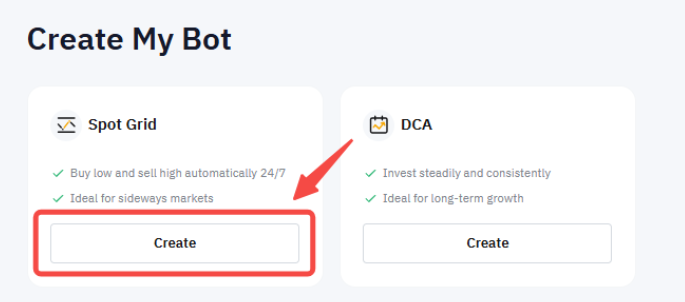
Step 1: Go to the Bybit EU Trading Bot page and click Create in the Spot Grid section.
Step 2: In Advanced Settings (Optional), check the Trailing Up box and set a trailing up stop price if needed.
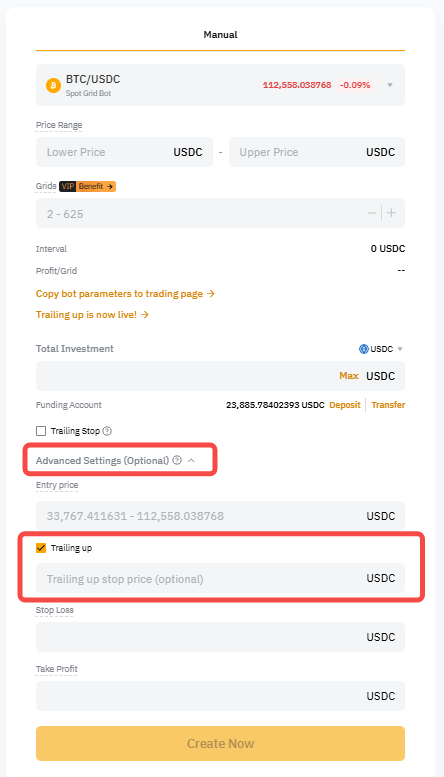
Note: The trailing up limit price defines the point where the bot stops adjusting the grid upward. If not set, the bot will continue trailing up until there are insufficient funds to keep five orders.
Step 3: Complete the rest of the setup as usual, then click Create Now.
Step 4: In the Confirmation popup, review all your settings, including the Trailing Up option, and click Confirm.
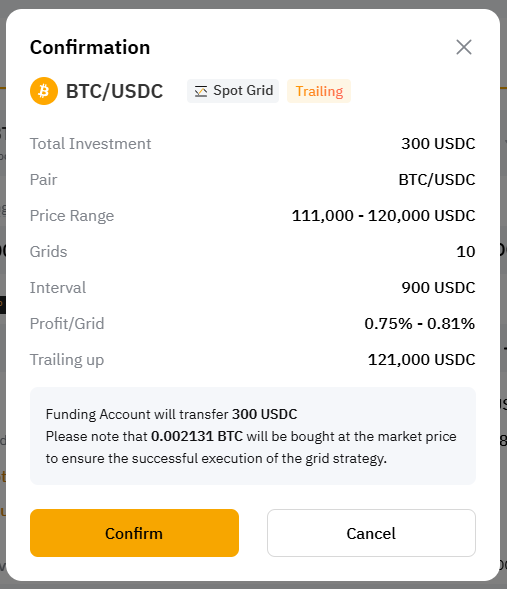
To check your original and adjusted price ranges, as well as the trailing up limit price if you've set one, just head to View My Bots → Active → Spot Grid → Details → Parameters. You can also make changes here if needed.