
What is Demo Trading?
Demo Trading allows users to practice crypto trading without risking real money by using a simulated trading account. It replicates real-world market conditions and uses simulated assets, enabling users to familiarize themselves with the trading platform or test trading strategies.
Read More
What Is Bybit EU Demo Trading?
How to Use Bybit EU Demo Trading (Step-By-Step)
What products does Demo Trading support?
Currently, Demo Trading is an account in Unified Trading Account (UTA) mode. This allows traders to engage in simulated trading for Spot Trading in UTA.
How do I create a Demo Account?
You do not need to create a Demo Account manually as it is available for all users.
How can I access or exit the Demo Trading?
On the Bybit EU Website, you can access Demo Trading by hovering your cursor over the profile icon located at the upper right and clicking on Demo Trading. To exit Demo Trading mode and return to your live trading account, simply click on Start Live Trading.
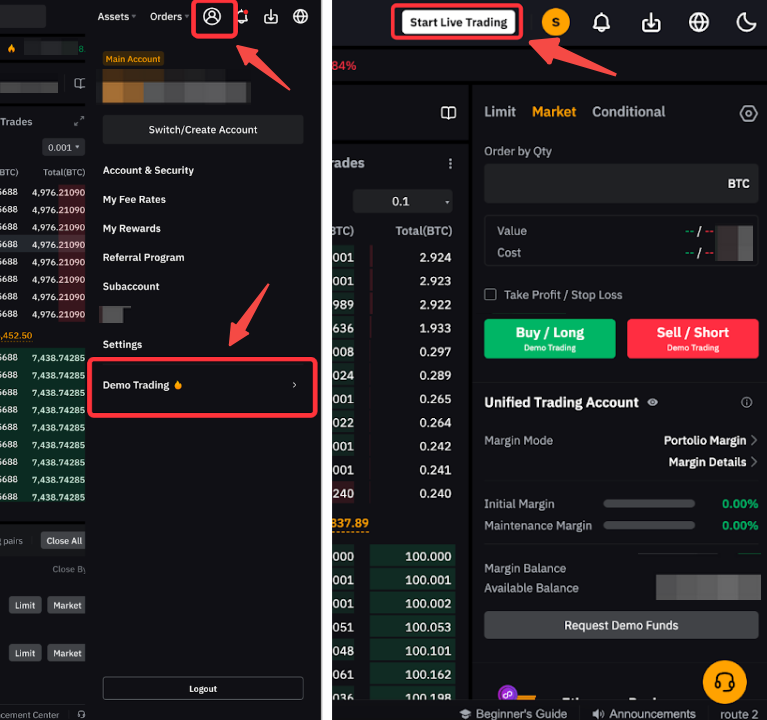
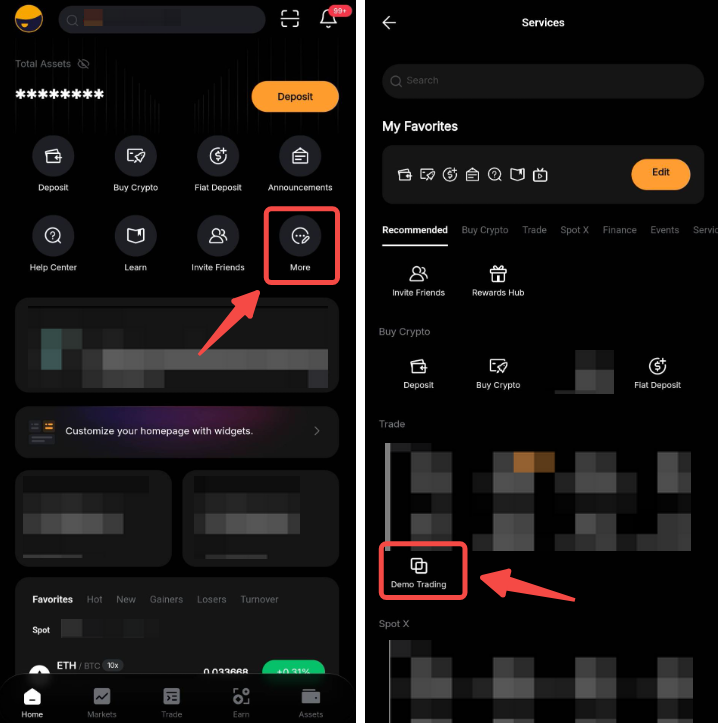
On the Bybit EU App, you can find the Demo Trading entrance by clicking on More → Demo Trading. When you are on the Demo Trading page, click on Start Live Trading in the upper right corner of the trading page to go back to live trading.
Is Demo Trading supported on Subaccount?
Yes, Demo Trading is supported on Subaccounts. Please note the Demo Trading account in your Subaccount will be a different account from the one in your Main Account.
Can I reset my Demo Account?
No, the Demo Account cannot be reset. However, if you do not have access to your Demo Account for more than 30 days, your demo account will be refreshed and its data will be cleared.
What's the difference between a Demo Account and a Testnet Account?
A Demo Account operates within the main trading platform, offering a simulated environment that mimics real trading conditions. In contrast, a Testnet Account is an entirely separate platform used primarily for testing new features and updates before they're implemented on the main platform. Testnet Accounts may not always provide the most accurate representation of live trading conditions.
For details, please refer to the following:
How do I request funds for my Demo Account?
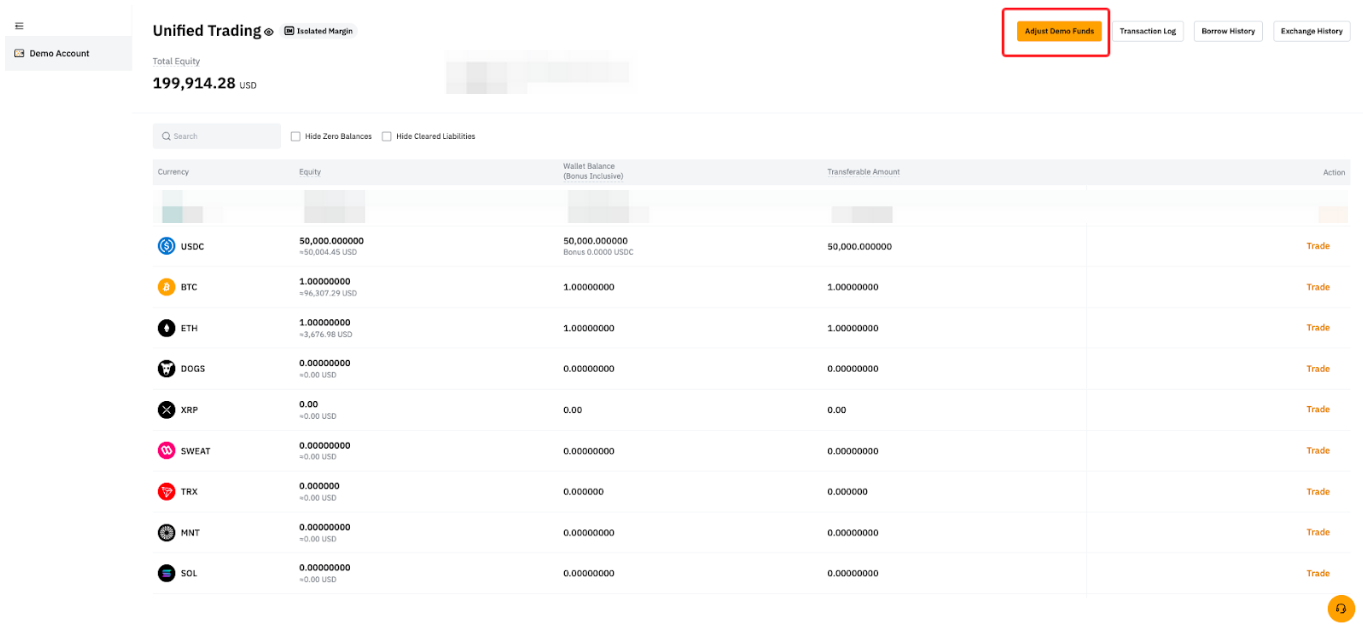
Upon initializing your Bybit EU Demo Account, you will automatically receive simulated assets of 50,000 USDC, 1 BTC, and 1 ETH. There's no need to request funds manually.
Can I request additional assets on my Demo Account?
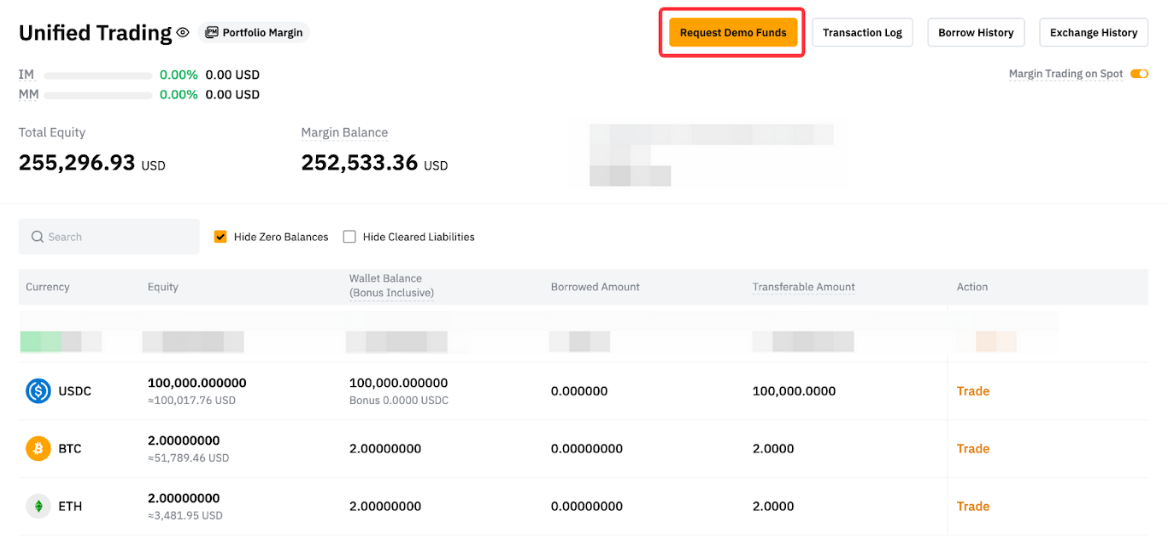
Yes, you can request additional assets if the total equity value falls below 10,000 USDC in your Demo Account. However, no assets can be requested when the Demo Account equity value is above 10,000 USDC.
Can I request assets other than USDC, BTC, and ETH?
No, only these 3 assets are available for request. However, you can use Spot trading on the Demo Account to trade your assets.
Can I adjust the demo funds in my demo account?
Yes, you can go to the Unified Trading Account asset page of your demo account to adjust your demo funds.
Where can I request additional assets for Demo Trading?
You can request additional demo funds by clicking on Request Demo Funds on the Demo Account's Asset page.
Can I withdraw funds from my Demo Account?
No, the funds in your Demo Account are simulated assets and cannot be withdrawn.
Is Identity Verification (KYC) required to use a Demo Account?
No, Identity Verification is not required for using a Demo Account.
How can I differentiate if I am currently in Demo Account or Live Trading Account?
You will be able to see a Demo Trading label on the header if you are in Demo Account mode.
Can I log in to my Demo Account directly?
No, you will need to log in to your Bybit EU Main Account or Subaccount and then switch to your Demo Account.
Will my Demo Account ever expire?
No, your Demo Account will remain active as long as you have a Bybit EU Account. You can continue to practice and refine your trading strategies without any time limitations. However, please note that if you do not access your demo account for 30 days, your demo account will be refreshed and its data will be cleared.
Why am I unable to use features other than Spot trading on my Demo Account?
The Demo Account is designed for trade simulations and testing of trading features based on market prices. If you wish to test non-trading features, please proceed to our Testnet.